

The planning tool for creative and marketing teams
Your creative and marketing tracker.
Pelican comes ready with what teams usually set up themselves in Monday or Airtable: a request form, rounds with owners and due dates, workload by hours, and campaigns with their launch dates. Your AI agents can work in it too, through MCP.
Why switch from Monday or Airtable
Your AI agents can work in Pelican
Connect your AI agents to Pelican to read and update requests, phases, and time off in plain language. They act as you, with your permissions.
Pelican has an MCP server, so it works with MCP-compatible agents such as Claude.
What an agent can do
- Find requests, campaigns, the team, and time off, and read a request’s full history
- File new requests and one-off tasks
- Move due dates, change owners and status, and add or remove phases
- Fill in estimated and actual hours, when your workspace tracks them
- Plan and update campaigns on the Marketing board
- Book and change time off
Your permissions
It can do what you can do, and nothing more.
In the history
Its changes are marked as made through an AI agent.
Yours to disconnect
Remove a connection in Settings at any time.
History: Ava Lindqvist · Creative R2 due date and owner · via AI agent
One plan, seen the way you need it
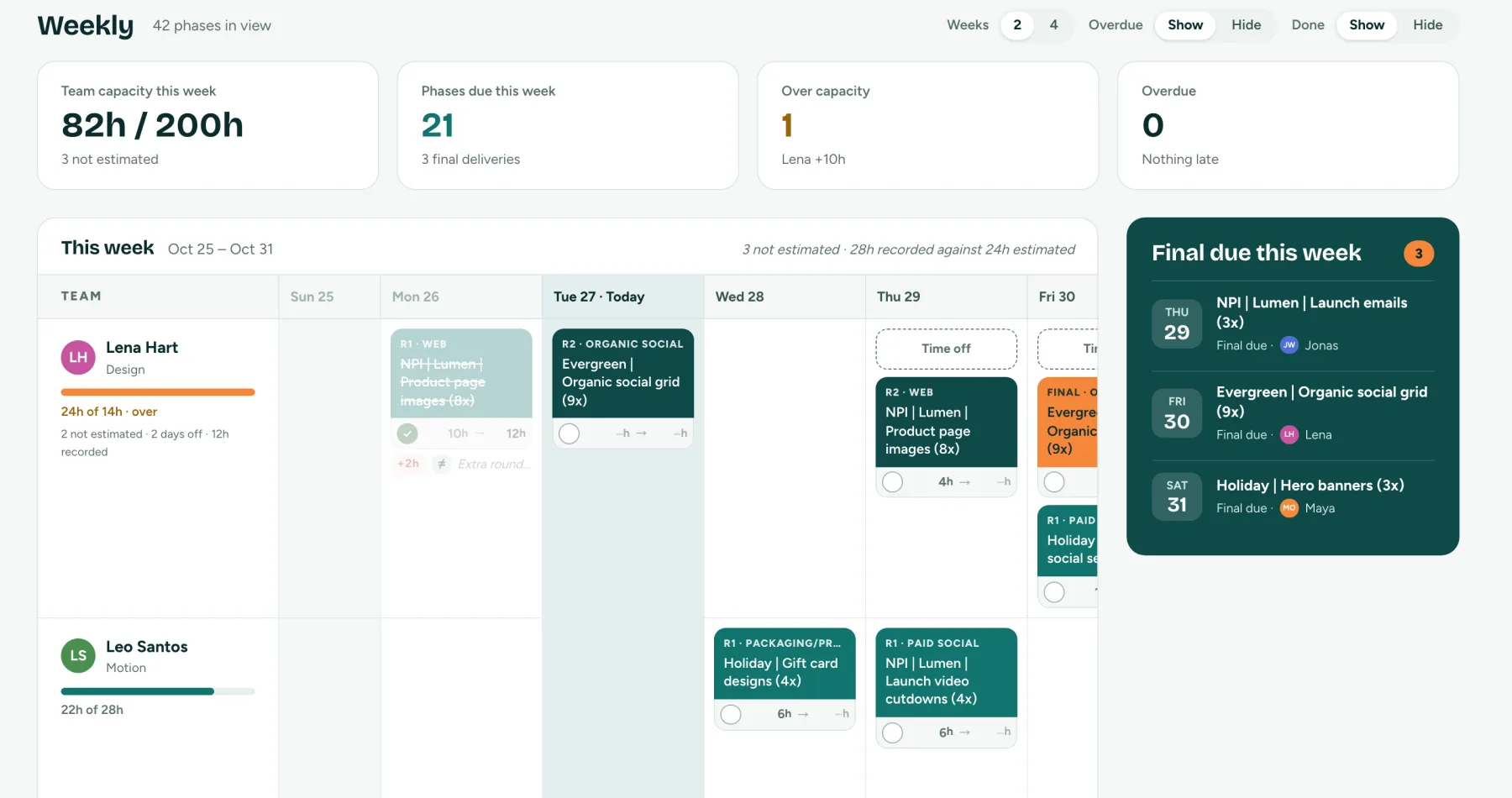
Each person's week by day, with their hours against capacity, the phases due, time off, and the final deliveries coming up.
From request to delivery
- 1
Someone files a request
Anyone on the team fills in the request form. Pelican builds the name, and the request waits in New Requests for the creative team.
- 2
The creative team plans it
They set the phases, owners, due dates, and hours, and put it on the plan. It shows up on everyone’s week straight away.
- 3
The work gets delivered
Owners mark phases done as they go. Everyone sees what’s due this week, what’s late, and what’s landing next.
See Pelican with your own work
Tell us about your team and we’ll set up a workspace with your channels, products, and people.
Built for everyone in the process
Creative leads
Plan the week from one place: who has room, what’s due, what’s late, and who is away. Move work between people when someone is off.
Designers and copywriters
See your own week with every phase you own, its brief, and its files. Mark rounds done and, if your team tracks time, log the hours you spent.
Marketing managers
Plan campaigns by channel and go-live date, send them to Creative as requests, and follow each one from your board.
Anyone who needs creative
File a request with a short form and follow it as it moves through copy, rounds, and delivery.
Everything in Pelican
Request form per channel
Each channel asks its own questions, so briefs arrive complete.
Built request names
Names come from the moment, product, what’s being made, and the market.
Phases and owners
Copy, two creative rounds, and Final, each with an owner, date, and status.
Workload and capacity
Estimated hours per person against their weekly capacity, when you turn estimates on.
Time off and handover
Booking time off lists the work due while someone is away.
Actuals and accuracy
Compare estimates with the hours spent, by person, phase, and channel.
Change history
Every request records who changed what, and when.
Campaigns linked to requests
Marketing’s campaigns and the creative they need stay connected.
MCP for AI agents
Connect your AI agents to read and update the plan as you.
Roles and permissions
Admins, the creative team, marketing, and requesters each get the access they need.
Light and dark mode
Follows your computer’s setting, or pick one.
Access you control
Roles and permissions
Only the creative team changes dates, hours, and owners. Marketing edits the content of requests, and requesters edit their own.
Change history
Every change to a request is recorded with who made it and when, including changes made through an AI agent.
Invites and removal
Your admins invite people by email. Removing someone signs them out and disconnects their AI agents straight away.
Questions
Who is Pelican for?
In-house creative and marketing teams that plan requests, rounds, and campaigns together: a creative lead, designers, copywriters, motion designers, and the marketers who request their work.
How do we get access?
Pelican is invite-only for now. Email us about your team and we’ll set up your workspace with you, including your channels, products, and team. Your admins then invite everyone else.
Does it replace Monday or Airtable for this work?
For planning creative requests and campaigns, yes. Pelican comes with the request form, phases, owners, workload, and campaign board that you’d otherwise build yourself. If you use Monday or Airtable for other work, you can keep using them for that.
Can marketing and creative both use it?
Yes. Marketing plans campaigns on its own board and sends them to Creative as requests. Both teams see the same requests, dates, and status.
Do we have to track hours?
No. Estimates and actuals are switches in Settings. With both off, Pelican plans by dates and owners only, and hides every hours field.
Can our AI tools use Pelican?
Yes. Pelican has an MCP server, so MCP-compatible agents such as Claude can read and update your plan. An agent acts as the person who connected it, with that person’s permissions. Its changes show in the change history, and you can disconnect it in Settings at any time.
What does it cost?
Talk to us. Email us about your team and we’ll walk you through it.
Request access
Email us about your team and we’ll get you set up.